
-
System General
General system navigation
-
Code Tables
Common code table setup
-
Pre-Production
Style design, Bill of Material (BOM)
-
Production
Production related (Material PO, CUT/PO, etc.)
-
Distribution
Sales order, fulfillment, etc.
- Add new inventory from file
- Drill down approach
- Export customer address
- How to adjust product inventory
- How to receive RMA
- How to transfer between warehouse
- How to zero out entire inventory of selected warehouse
- How to zero out inventory
- Instant open order report
- Line-Sheet print
- Product inventory order allocation (Priority based allocation)
- Sales Order entry
- Sales Order item close (apply to all orders)
-
Accounting
Invoice, RMA, Return Credit, Debit, AR
-
Report
Report creation
-
Utilities
Tools to provide improve productivity
-
How To..
Category description
- Add new inventory from file
- Change password
- Create RMA for return
- How to add a new Journal Entry (Credit/Debit)
- How to add new UPC codes
- How to add payment record using credit memo
- How to adjust product inventory
- How to receive RMA
- How to run AP (Accounts Receivable) Open Bill Report
- How to zero out entire inventory of selected warehouse
- How to zero out inventory
- Instant open order report
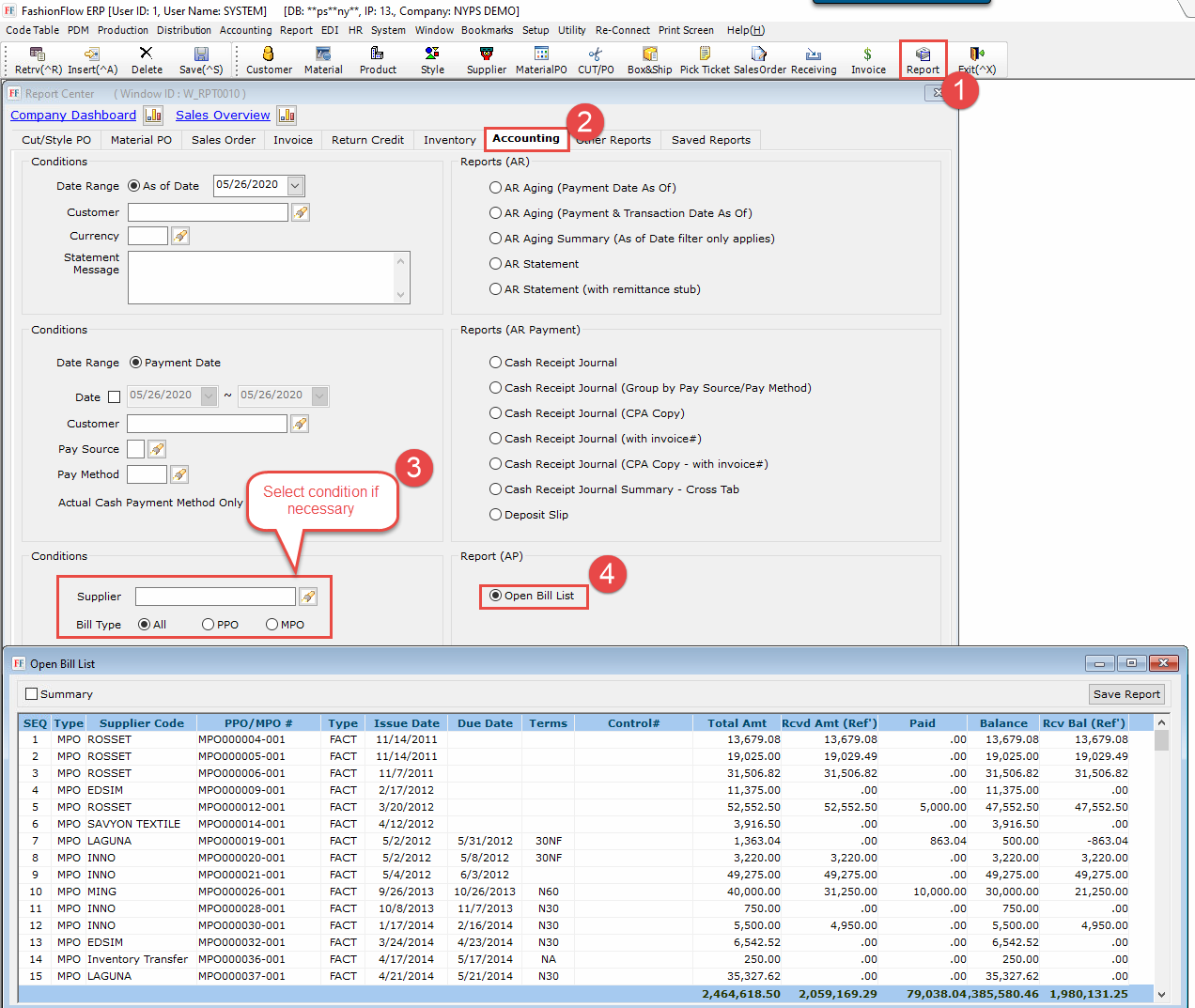
How to run AP (Accounts Receivable) Open Bill Report
Created On
Last Updated On
byfashionflow
Print
You are here:
< All Topics
- Click “Report” button
- Select “Accounting” tab
- Select condition to be applied
- Click “Open Bill List” report menu
Was this article helpful?
0 out Of 5 Stars
| 5 Stars | 0% | |
| 4 Stars | 0% | |
| 3 Stars | 0% | |
| 2 Stars | 0% | |
| 1 Stars | 0% |
5